Best bike radar with automatic power on and off 2026, top picks and comparison
At the start of your daily commute, a bike radar with automatic on/off can reduce manual adjustments. However, check whether this feature controls the light, detection or simply waking from standby.
Prices collected from retailers are for guidance only: they may have changed since, the current price is the one shown by the retailer. No price is shown for models sold only on Amazon. Amounts converted from reference prices in euros using a dated exchange rate.
How we picked these models
- 1 model selected because they have the feature “Automatic power on and off” according to data published by manufacturers and retailers.
- See how we rate →
- No brand pays to be included in this selection or to rank higher.
Our guides to bike radar
 Faults and troubleshooting What should you check if your bike radar’s rear light is off?
Read the guide →
 Connectivity How to choose a bike radar based on its connectivity
Read the guide →
Why choose a bike radar with automatic on/off?
Why look for a bike radar with automatic on/off?
A bike radar with automatic on/off can reduce manual steps when setting off and arriving, provided its automatic functions cover these situations. The aim is to simplify your routine while still checking that the device is working and that you are receiving its alerts.
Preparing your bike already means thinking about lights, luggage and your route. Clearly documented automatic operation can make this preparation easier. However, it does not guarantee you will never forget anything, particularly charging or the device that displays alerts.
The term “automatic” therefore deserves your attention. Automatic bike radar activation, shutdown and a simple standby mode do not necessarily describe the same behaviour. The light and detection may also use different controls. Before choosing, make sure you understand what actually activates, under what conditions and how you can control it.
The practical benefit is therefore a simpler, more predictable routine. Automatic operation that suits your habits will be more useful than a feature whose triggers remain unclear.
Which cyclists could benefit from this feature?
For daily journeys, the main benefit is convenience. When you repeat the same preparations every morning and evening, reducing manual controls can make setting off smoother. You should still perform a quick check that everything is working before riding.
Journeys with frequent stops require closer attention to how the device behaves. A pause outside a shop, a longer stop and putting the bike away involve different needs. Standby and reactivation must be clear enough for you to know whether alerts are available when you set off again.
- For regular journeys, prioritise operation that is easy to check before each departure.
- For rides with breaks, focus on the conditions for reactivation.
- For occasional rides, choose straightforward controls and maintain a charging routine.
Group rides raise an additional question. If you are also looking for a bike radar with peloton mode, check this feature separately: automatic on/off tells you nothing about how alerts behave within a group.
Why does a radar not replace your own vigilance?
A rear bike radar helps you stay aware of traffic behind you. Its purpose is to draw your attention to a situation that needs monitoring, without giving you a complete picture of the surrounding traffic on its own.
The absence of an alert does not guarantee a clear road. Always check traffic before moving out, turning or passing an obstacle. An alert is no more a signal that it is safe to manoeuvre: you must assess the situation and maintain a predictable line.
This distinction also applies to lighting. Looking for a bike radar with a steady light addresses a visibility need; looking for automatic operation addresses a need for simplicity. These features should be considered separately.
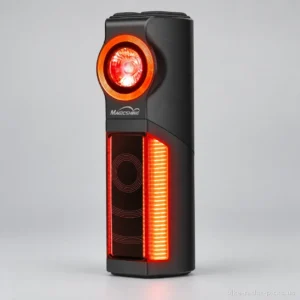
The selection on this page lets you explore these considerations further with the Magicshine SEEMEE R300. Before choosing it, check the exact conditions of any automatic operation it offers and how you will receive alerts, so you can choose according to the journeys you actually make.
How do you choose a bike radar with automatic on/off?
To choose the best bike radar with automatic on/off, first check what the device actually automates. Turning on the light, activating detection and waking from standby are separate functions. Automation becomes useful if its triggers suit your rides and the alerts remain easy to check.
What does automatic on/off actually control?
Look beyond the word “automatic”. It should come with a precise description of how the radar and its light behave. Standby does not necessarily mean a complete shutdown or that all functions reactivate when the device restarts.
Before choosing, look for answers to these questions in the manual:
- What triggers power-on, standby and shutdown?
- Does vehicle detection remain active when the light changes state?
- How can you check that the device has reactivated correctly?
- Is manual intervention still needed after some stops?
For rides with frequent stops, favour clearly explained operation. Without confirmation in the documentation, do not assume automatic operation is supported.
Which detection and alert criteria should you examine first?
The priority is to receive a clear alert when it matters. A claimed maximum range alone is not enough to distinguish between devices: also examine the stated detection limits and how vehicles are indicated.
Check what the display lets you distinguish and which audible or visual alerts are available. Choose according to how you check your equipment, particularly when your attention is focused on the road. The radar provides information about traffic behind you; you must always check traffic before manoeuvring.
| Criterion | What to look for | Common mistake |
|---|---|---|
| Automatic operation | Documented triggers and reactivation conditions | Confusing standby with complete shutdown |
| Alerts | Easy-to-read information with explicit detection limits | Choosing solely on the basis of the claimed range |
| Compatibility | Confirmed pairing with your exact equipment | Assuming compatibility from the product name alone |
| Battery life | Enough battery life for your route in the intended mode | Comparing battery life figures from different modes |
| Mounting | A suitable mount and an unobstructed position | Overlooking the saddlebag or luggage |
How can you check compatibility with your equipment?
First, identify the device needed to receive alerts: a bike computer, phone or dedicated receiver, depending on the documented options. Then check the required connections, any restrictions and the necessary settings.
If you are looking for a Garmin-compatible bike radar or a Wahoo-compatible bike radar, check your exact bike computer model in the compatibility documentation. The brand alone does not confirm compatibility. Also check whether automatic functions require a paired device or remain available independently.
How much battery life do you need for your rides?
Start with your longest route and allow extra time for detours and stops. Then compare this requirement with the claimed battery life in the mode you intend to use. A runtime quoted for a particular light setting does not necessarily apply to other configurations.
Check the measurement conditions, low-battery indication and charging requirements. For everyday journeys, focus on whether charging fits easily into your routine. Do not assume that standby mode guarantees enough battery life between rides.
How can you check whether the mount suits your bike?
Check that the mount is compatible with your seatpost shape and the available space. Identify the intended position with your luggage fitted: a saddlebag must not obscure the device or prevent it from being aligned as instructed in the manual.
Also check which accessories are included and which need to be obtained separately. For rides in the rain, look for explicitly documented weather protection and its limitations. The appearance of the housing does not establish its durability.
Which product tier should you choose, and what should you know about the Magicshine SEEMEE R300?
To distinguish between entry-level, mid-range and high-end options, look for documented differences: automatic operation, how alerts are displayed, compatibility, mounting and required accessories. A higher product tier does not guarantee a better fit for your bike.
The Magicshine SEEMEE R300 is the only model in this selection. The specifications needed to confirm its automatic operation are not established here. It therefore cannot be named the best choice on this criterion. Before choosing it, seek confirmation of its activation triggers, reactivation behaviour and compatibility with your equipment.
Mistakes to avoid
- Equating the light switching on automatically with automatic radar activation.
- Buying without checking how alerts will be received.
- Comparing battery life figures without checking the corresponding modes.
- Approving the mount without accounting for luggage.
- Treating the absence of an alert as a guarantee that the road is clear.
Key takeaways
Choose an automatic feature that is clearly documented and suited to your stops, then check the alerts, compatibility, battery life and installation. If any of these points remain unclear, hold off on choosing: a clearly described feature is more useful for making a decision than a simple promise of convenience.
What should you know before buying a bike radar?
What is the difference between a bike radar and a standard rear light?
A bike radar detects vehicles approaching from behind and sends an alert, while a rear light makes you visible. The combination of functions varies by model. Check each function separately: detection, lighting and automatic operation. A light switching on automatically does not mean the radar also starts. The device needed to receive alerts should also be specified before purchase.
Can a bike radar record video of vehicles?
No, the radar function alone cannot record video of vehicles. Detection and video recording are separate functions: a camera must be explicitly listed for this use to be possible. For the Magicshine SEEMEE R300, the available specifications do not confirm a video function. If you want to save footage, check the manufacturer's documentation for a camera and details of how recording works.
Can a bike radar replace a rear-view mirror?
A bike radar does not replace visually checking traffic before a manoeuvre. It alerts you to approaching vehicles but does not give you a complete view of your surroundings. A rear-view mirror can complement this information, but you still need to look directly when the situation requires it. The absence of an alert does not guarantee the road is clear. Keep this limitation in mind before turning or moving out.
How do you maintain a bike radar without damaging it?
Follow the manufacturer's instructions to clean your bike radar and protect its connectors. Before doing any maintenance, switch off the device and disconnect its charging cable. Avoid high-pressure water jets, abrasive products and immersion unless explicitly permitted. A rating such as IPX6 on a bike radar does not mean every cleaning method is allowed. Also check regularly that the device is clean and its mount is in good condition.
Can you use a bike radar on a group ride?
Group use depends on the conditions and limitations specified by the manufacturer. Do not assume that alerts can distinguish other cyclists from vehicles in every situation. If you are looking for a bike radar with a peloton mode, check what this mode actually changes. During the ride, keep the area behind the device clear and continue communicating hazards to the group: individual alerts do not replace collective vigilance.
What lighting rules must you follow when using a bike radar?
When a bike radar also serves as a rear light, it must comply with the lighting rules in the country where you ride. Having radar or automatic functions does not guarantee compliance. Before choosing a bike radar with a steady light or another lighting mode, consult local rules and the manufacturer's guidance. Check that the light stays on whenever it is needed, particularly during stops and when the device enters standby mode.